The statement “we learn by doing” could be considered common sense. Perhaps it is stating the obvious and yet too many in the academic community need still need to be convinced of this fact. Freeman et al. revealed in their meta-analysis of 225 studies that compared science, technology, engineering, and mathematics (STEM) classes that:

average examination scores improved by about 6% in active learning sessions, and that students in classes with traditional lecturing were 1.5 times more likely to fail than were students in classes with active learning.” (p. 8410)

While the 6% increase in test scores may not seem overly significant, it can make the difference between a pass or a fail. Furthermore, the data does reveal that active learning does reduce the chances of failure.
Active Learning succes
Carl Wieman, a Nobel-winning physicist who now does research on teaching and learning, argues that this extensive quantitative analysis by Freeman et al. on active learning in college and university STEM courses provides evidence:

that it is no longer appropriate to use lecture teaching as the comparison standard, and instead, research should compare different active learning methods, because there is such overwhelming evidence that the lecture is substantially less effective. (8320)

We must be careful to not jump to unrealistic conclusions and suggest that we stop lecturing all together. This isn’t reasonable because there are times when explaining concepts to students or sharing expertise is the most effective thing to do. There will always be a place for lecturing but the data is suggesting that the role should be diminished and greater emphasis should be placed on active learning activities.

For those who have been studying learning approaches these findings are not new. Active learning research has revealed that active learning approaches consistently provide better learner achievement than lecture only approaches. If we really want to be evidence-based then we need to stop comparing active learning approaches to the lecture and start exploring what active learning activities work best in what situations.

Determining what activities work best in what context is central to blended-learning. The reason well design blended learning is working is that most of the blended activities that get added to the learning environment have an active learning perspective. The key is the purposeful design of the learning environment starting with a clear overall course goal and well aligned outcomes, activities and assessments. All factors have to be taken into consideration and we must not loose site of the fact that our learner learn by doing.

References:
Freeman, S., Eddy, S.L., McDonough, M., Smith, M.K., Okorafor, N., Jordt, H., and Wenderoth, M.P., (2014). Active learning increases student performance in science, engineering, and mathematics. Proceedings of the National Academy of Sciences (PNAS), 111 (23), 8410-8415.

Weiman, C.E., (2014. Large-scale comparison of science teaching methods sends clear message. Proceedings of the National Academy of Sciences (PNAS), 111 (23), 8319-8320.
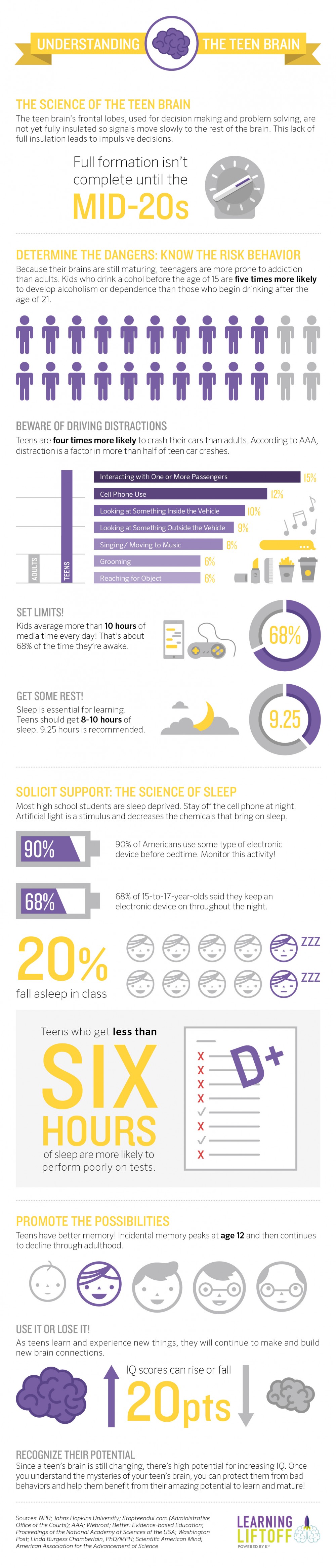
TeenBrainWeb

Source: http://www.learningliftoff.com/infographic-understanding-the-teen-brain

In a recent Using Video & Digital Media to Engage Students information session for the School of Health Sciences at British Columbia Institute of Technology (BCIT) I shared some of my favorite media creation tools. The following are all the tools that I have used or are still using on a regular basis. In future posts, I will go into greater detail on how to use these tools.

Digital Storytelling

The Center for Digital Storytelling is my starting point for creating powerful stories. The Digital Storytelling Cookbook PDF is worth the $20 US but in case you want to check it out first before spending the money you can always start with preview a partial version of the book at:
http://storycenter.org/s/cookbook_sample.pdf

Video

iMovie
If you are a Mac user then you should already have iMovie on your system. If you don’t your best your best starting point for iMovie https://www.apple.com/ca/support/mac-apps/imovie/
This site covers everything from where to download iMove to how to use it and connect to others who are using the software.

Not Suited for School But Suited For Learning was created using iMovie & Audacity

Camtasia
Screen Recording & Video Editing – Camtasia helps you create professional videos by enabling you to easily record your screen movements and actions, or import HD video from a camera or other source. Works on both Mac and Windows platforms. Techsmith the makers of Camtasia does offer an educational discount:
https://www.techsmith.com/camtasia.html

Screenflow
Screencasting and video editing software for the Mac. With ScreenFlow you can record the contents of your entire monitor while also capturing your video camera, iOS device, microphone and your computer audio. Screenflow and Camtasia are very similar. Most hardcore Mac users will prefer Screenflow.
http://www.telestream.net/screenflow/overview.htm?clickid=xuzSKLysuy6c0VXVklzzeRoOUkWT65VUEUS7XI0&iradid=36261&irpid=10073

Keynote
If you are a Mac user then you should already have Keynote on your system. If you don’t your best your best starting point for keynote is: https://www.apple.com/ca/support/mac-apps/keynote/
This site covers everything from where to download Keynote to how to use it and connect to others who are using the software.

Creating Significant Learning Environments was created with Keynote & Audacity

Audio

Audacity®
Audacity® is free, open source, cross-platform software for recording and editing sounds.
http://web.audacityteam.org/

Audacity tutorial – http://wiki.audacityteam.org/wiki/Category:Tutorial

Free audacity tutorials – https://www.youtube.com/user/FreeAudacityTutorial/videos

Garageband
If you are a Mac user then you should already have Garageband on your system. If you don’t your best your best starting point for Garageband is https://www.apple.com/ca/support/mac-apps/garageband/
This site overs everything from where to download Garageband to how to use it and connect to others who are using the software.

Windows Video Tools

I stopped using Windows on a full-time basis back in 2006 and I only use now if I really have to. I am including this information because BCIT is still primarily a PC based institution so Windows is the default OS. Microsoft’s MovieMaker attempts to do what iMovie does and PowerPoint is a very limited version of Keynote.

MovieMaker
Microsoft calls MovieMaker your very own movie studio
http://windows.microsoft.com/en-ca/windows-live/movie-maker

PowerPoint
Your best starting point for learning how to fully use Powerpoint
https://support.office.com/en-ie/article/PowerPoint-2013-training-courses-videos-and-tutorials-bd93efc0-3582-49d1-b952-3871cde07d8a

Equipment Tips

Microphone
I have been using a Blue Yeti USB Microphone for the past 6 years and have no reason to look for anything better.

Lighting
The CowboyStudio Photography/Video Portrait Umbrella Continuous Triple Lighting Kit with Three Day Light CFL Bulbs, Three Stands, Two Umbrellas, and One Carrying Case For Product, Portrait, and Video Shoots sells for just under $90 and does a wonderful of providing basic 3 point lighting. The stands are not that robust and if you are planning on being mobile it would be worth while upgrading to a higher quality system. However if you just want to light your videos, screenflow or camtasia sessions this bargain priced system works just fine.
Cowboy Studio-Photography-Portrait-Continuous-Umbrellas

https://youtu.be/8qvFLEPOEVM

canadian_flag_against_blue_sky

Looks like Hockey isn’t the only thing that we are are tops at. Canada tops OECD rankings in Post Secondary Education (PSE) spending, adult PSE attainment
https://www.timeshighereducation.co.uk/news/canada-tops-the-heap-for-he-investment/2015636.article

More Canadians have post-secondary education than other OECD nations, survey says:
http://www.thestar.com/yourtoronto/education/2014/09/09/more_canadians_have_postsecondary_education_than_other_oecd_nations_survey_says.html

Read the full Report – Education at a Glance 2014: OECD Indicators